How to Automate SEO with Claude: 13 Prompts, a Workflow and a Checklist


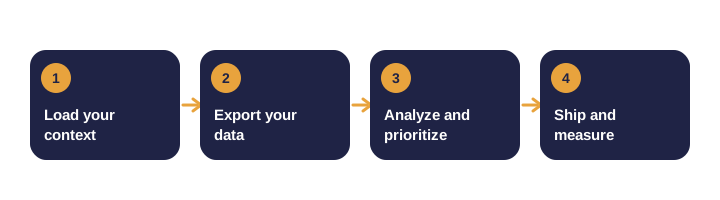
Most SEO work is repetitive. You export data, scan for patterns, decide what to fix, write new copy and check the results. Claude can do much of the scanning and drafting, which frees you to make the decisions.
This guide shows how to set that up. It covers what to prepare, 13 prompts you can copy, a full monthly workflow, a checklist and the guardrails that keep automated SEO safe.
What does automating SEO with Claude really mean?
It does not mean letting an AI change your website unsupervised. It means turning slow, manual analysis into a fast, repeatable routine where you stay in control of decisions.
| Task | Claude is good at | You still need to |
|---|---|---|
| Finding patterns in exported data | Scanning thousands of rows quickly | Confirm the export is complete and the date range is right |
| Writing titles and descriptions | Producing several options fast | Choose the one that matches the page and the promise |
| Reviewing crawl files | Grouping issues by severity | Check that each issue is real before fixing it |
| Drafting content briefs | Outlines and question lists | Add real expertise, examples and sources |
| Summarizing performance | Plain-language reports | Decide which changes matter most |
What do you need before you start?
Gather these inputs once. Most monthly runs only need a refresh of the exports.
| Input | Why it matters | Where to get it |
|---|---|---|
| Search Console performance export | Real queries, pages, clicks and positions | Search Console, Performance report, export to CSV |
| Analytics data | Conversions and behavior on key pages | Google Analytics 4 reports |
| Crawl export | Technical issues across the whole site | A site crawler such as Screaming Frog, exported to CSV |
| List of money pages | The pages that drive inquiries or sales | Your own list, ranked by revenue or leads |
| Keyword data | Opportunities your site is missing | Your keyword tool, exported with volume and difficulty |
| Business profile data | Local categories, services, reviews and posts | Business Profile dashboard and a manual copy of key fields |
Step 1: Load your business context
Paste this once at the start of a project. Fill in every bracket, then ask Claude to confirm its understanding before you run anything else. Every later prompt becomes sharper because Claude knows who you are, what you sell and what you are not allowed to claim.
Prompt 1: Business context
You are my SEO analyst. Save the business context below and use it for every task in this project. Do not ask me for these details again unless a task needs something missing.

BUSINESS
- Name and legal entity: [business name]
- Website: [URL]
- Google Business Profile: [URL]
- Location and service areas: [main city], plus [city 2], [city 3]
- Years in business and team size: [years], [solo / small team / larger team]

SERVICES AND CUSTOMERS
- Main service (highest revenue): [service]
- Other services: [service 2], [service 3]
- Ideal customer: [who they are, the problem they have, what triggers the search]
- Typical job value: [amount or range]
- Where most leads come from today: [search, referrals, ads, other]

GOALS (next 90 days)
- Main goal: [for example, more booked calls from search]
- Keywords I most want to rank for: [keyword 1], [keyword 2], [keyword 3]
- Pages that already bring leads: [URLs, if known]

CURRENT SITUATION
- Biggest SEO problem, in one honest sentence: [problem]
- What has already been tried, and the result: [agency, tools, content, links]
- Competitors I am compared against: [name, website] for each
- Constraints: [budget, hours per week, who approves changes, no-go areas]

HOW YOU SHOULD WORK
1. Before starting, list any fields above that are blank and matter for the task. Ask me once, then continue.
2. Lead with quick wins, then longer projects.
3. For each recommendation, give the impact (high, medium or low), the effort, and how long results usually take.
4. Use tables for comparisons and numbered steps for actions.
5. Separate facts from assumptions. Mark anything you inferred.
6. If you are unsure, say so. Never guess numbers, rankings or traffic.
7. Never invent reviews, statistics, awards, certifications or client names.
8. Never promise rankings or results.

Confirm your understanding in five bullet points, listing the main goal, the top service, the service areas, the biggest problem and the first action you recommend.
Step 2: Analyze search performance
This is the core of the monthly loop. Export the last 90 days of queries and pages from Search Console, then upload both files.
Prompt 2: Find the opportunities
I have uploaded two Search Console exports for the last 90 days: queries.csv and pages.csv.

Find:
1. Queries ranking between positions 4 and 15 with at least 50 impressions. List the top 20 by impressions, with the page that ranks for each.
2. Pages with at least 500 impressions and a click-through rate under 2 percent. These usually need a better title or description.
3. Queries where two or more of my pages compete for the same search (cannibalization).

Output three tables with these columns: query or page, page, position, impressions, clicks, CTR, suggested action.
Then list the five actions you would do first, and why.Step 3: Fix titles and descriptions
Pages on the second results page, or pages with plenty of impressions and few clicks, often need better wording rather than new content.
Prompt 3: Rewrite titles and descriptions
For each page below, write three title options under 60 characters and three meta descriptions under 155 characters.

Each title and description must:
- include the main query naturally,
- state one concrete benefit,
- differ clearly from the other options.

Recommend one option per page and explain the choice in one sentence.

Pages (URL, current title, current description, main query):
[paste 10 rows]
Step 4: Run a technical audit
Crawl your site, export the results and let Claude group the issues by how much they matter.
Prompt 4: Technical audit from a crawl export
Here is a crawl export of my site (columns: URL, status code, title, meta description, H1 count, canonical, indexability, word count, internal links in, response time). I have uploaded it as crawl.csv.

Group the issues into three levels:
- Critical: pages blocked from indexing, server errors, redirect chains of two or more hops, noindex tags on money pages.
- Important: broken internal links, missing or duplicate titles, more than one H1, missing canonical tags.
- Minor: short descriptions, thin pages under 300 words.

For each level, list the affected URLs and the exact fix. Mark any issue you think may be a false positive.
Step 5: Build internal links and schema
Internal links tell search engines which pages matter. Structured data tells them what those pages are.
Prompt 5: Fix orphan pages and weak internal links
Using crawl.csv and this list of money pages: [paste list]

Find:
- orphan pages, meaning pages with zero internal links pointing to them,
- money pages with fewer than three internal links.

For each one, suggest two or three source pages that should link to it. Give the anchor text and the exact sentence to add. Do not add more than five links to any source page.
Prompt 6: Generate structured data
Write valid JSON-LD structured data for my site using only the facts below. If a field is unknown, leave it out. Do not invent details.

Business facts: [name, address, phone, founding year, service areas, social profiles]

Produce:
1. Organization and LocalBusiness markup for the homepage.
2. Service markup for each service page: [list services].
3. Article markup with author for each blog post.
4. FAQPage markup for pages that have a real FAQ section.

Output one script block per page type. Then give me a checklist for validating each block in Google's Rich Results Test.Step 6: Plan content from real gaps
Content gaps are topics your competitors cover and you do not. Turn them into briefs your writers can follow.
Prompt 7: Content briefs from a keyword gap list
Here are 30 keywords where my competitors rank and my site does not. The file gaps.csv includes volume and difficulty from my keyword tool.

Group them into three intent types:
- problem-aware (the person has a problem but no solution yet),
- comparing options,
- ready to hire.

For the top ten in each group, write a content brief with:
- target query and search intent in one line,
- recommended title and URL slug,
- an H2 outline of five to seven questions,
- facts and sources I must include,
- internal links to add,
- the call to action.
Prompt 8: Location page outline
Create a location page outline for [service] in [city]. Use only the local details below.

Local details: [neighborhoods served, landmarks, typical jobs, service hours, licenses]

Include:
- a title under 60 characters,
- a meta description under 155 characters,
- one H1,
- a 100-word opening that addresses an urgent local problem,
- a short section on what the job includes,
- three local FAQ questions,
- a call to action.

Flag any detail you need from me. Do not invent reviews, statistics or testimonials.
Step 7: Strengthen local visibility
For local businesses, your Business Profile is often the first thing a customer sees. Keep its categories, services and replies accurate and specific.
Prompt 9: Review and profile audit
I have pasted my Business Profile categories, services list and the last 30 reviews below.

Tell me:
1. Which primary or secondary categories I may be missing for these services.
2. Which services have no description, or a weak one.
3. Which replies are generic and need a specific detail.
4. Three reply templates (positive, neutral, negative). Each thanks the reviewer for a specific detail from their review and stays under 70 words.

Do not write replies that offer incentives for reviews. Do not invent details the reviewer did not mention.

[paste data]
Step 8: Compare competitors and find link opportunities
Competitor analysis shows where you are behind. Link prospecting shows where you can earn trust.
Prompt 10: Competitor page comparison
Compare my homepage and service pages with these three competitor pages. Text is pasted below for each page.

Build a table with these rows: topics covered, proof offered (case studies, numbers, certifications), trust signals, calls to action, and approximate length.

Then list:
- the three areas where a competitor is clearly stronger,
- the one area where I could be the most useful.

Base your answer only on the text I provide.

[paste text for my pages and competitor pages]
Prompt 11: Link prospect list
Here are sites that link to my main competitor, with my notes on each (file prospects.csv).

Sort them into: resource pages, local associations, industry publications, and sponsor or partner pages.

For the top ten, suggest:
- one angle I could pitch, in one sentence,
- the asset I would offer,
- a personalized outreach email under 90 words.

Do not suggest buying links, using link networks or exchanging links at scale.
Step 9: Refresh content that is losing clicks
Older articles often slip as competitors publish better answers. A focused refresh is faster than starting over.
Prompt 12: Content refresh plan
This article has lost clicks over the last quarter: [URL, title, last updated date, query data].

Compare it against the top three current results for its main query. Summarize each one in a few lines first, then:
- list what they cover that this article misses,
- list facts that are out of date and need a current source,
- list the sections to rewrite or expand,
- give a word count target for each section.

Output an update plan. Do not rewrite the whole article.
Step 10: Report monthly
A short, honest report keeps the team focused on what changed and what to do next.
Prompt 13: Monthly SEO report
Using the exports below (Search Console clicks, impressions and average position for the last 28 days and the previous 28 days, plus top pages and top queries), write a one-page report.

Include:
- three wins,
- three problems,
- one next action,
- a table of the five largest changes, with a plain-English explanation of each.

If the data is too thin to draw a conclusion, say so. Do not claim cause and effect unless the data shows it.

[paste exports]
The complete SEO checklist
Run through this list each month. Claude can help with most items, but the checks marked with a person are yours to confirm.
Technical
- No important pages blocked from indexing. (Confirm the robots file and noindex tags yourself.)
- No server errors on key pages.
- Redirect chains reduced to one hop.
- Canonical tags point to the preferred version of each page.
- Sitemap updated and submitted in Search Console.
- Key pages load quickly on mobile. (Test one page by hand.)
On-page
- One clear H1 on each page.
- Unique titles under 60 characters.
- Unique descriptions under 155 characters.
- Images have descriptive alt text.
- The main answer appears in the first 100 words.
Content
- Every new article has a brief, a named author and a clear next step.
- Facts are traced to sources, and sources are dated.
- Top pages refreshed at least every six to twelve months.
- Thin pages either expanded, merged or removed.
Internal links and structure
- No orphan pages.
- Money pages have at least three relevant internal links.
- Topic clusters link to their pillar page and to each other.
Local (if you serve a local area)
- Business categories and services match what you actually offer. (Confirm this in the profile yourself.)
- Business name, address and phone match across directories.
- Reviews answered within a few days, with specific replies.
- Photos and posts added on a steady schedule.
Authority
- New relevant links reviewed for quality, not just count.
- Any paid or sponsored links are labeled correctly.
- Brand mentions and citations checked for accuracy.
Measurement
- Monthly report covers clicks, impressions, position, calls or inquiries.
- Conversions tracked and checked against leads received.
- One action chosen for the next month and assigned to a person.
How do you make it automatic?
Full automation is possible, but the sensible version automates analysis and keeps publishing human. A practical setup looks like this:
- Schedule the exports. Set a monthly reminder, or use the Search Console API to save exports to a folder.
- Run the prompts in a saved project. Keep the business context and prompt library in one place so the outputs stay consistent.
- Review and approve. A person checks each recommendation against the data before anything changes.
- Track the results. Save each month's report so you can compare the trend over quarters.
What guardrails should you use?
- Verify every number against the original export before you act on it.
- Never invent reviews, statistics, awards, testimonials or client names.
- Respect site terms. Do not scrape review sites or competitor pages at scale in ways their terms forbid.
- No manipulation. Do not use Claude to generate fake reviews, spam directories or link networks.
- Disclose AI assistance where readers would expect it, and keep a named human accountable for every published page.
Common mistakes to avoid
| Mistake | What happens | Better approach |
|---|---|---|
| Running prompts without context | Generic advice that does not fit your business | Load the business context first |
| Mixing date ranges | Trends that look real but are not | Use the same range for every export |
| Publishing every suggestion | Over-optimized pages and lost quality | Choose the top three changes per month |
| Trusting the first answer | Errors in titles, facts or schema | Ask for a second check and verify sources |
| Skipping the measurement step | No way to tell what worked | Record each change and its date |
What should you do this week?
- Write your business context and save it as the first message in a project.
- Export 90 days of Search Console data and run Prompt 2.
- Pick ten pages from the results and run Prompt 3.
- Schedule the next monthly review in your calendar.
Need a team to run this for you?
Our AI-focused SEO service runs this kind of workflow with a person reviewing every change. We start with a free growth audit that shows where your biggest gaps are.
For more on the foundations, read our guides to AI SEO, ethical link building and the website launch checklist.
Frequently asked questions
Can Claude check my Google rankings by itself?
Not unless you give it data or connect a tool you have authorized. Export your Search Console data and upload it, then Claude can analyze it.
Is it safe to let AI change my website automatically?
It is safer to automate analysis and drafts, and keep a person approving any change to a live page.
How often should I run these prompts?
Run the performance analysis and reporting monthly. Run the technical audit after major site changes and at least quarterly.