Marketing Automation for Small Business: Work Less, Follow Up Faster


Many small businesses lose leads not because their offer is weak, but because nobody follows up quickly. Reports are built by hand, and customers get the wrong message at the wrong time.
Marketing automation uses software to handle those repeatable steps, so your team can focus on judgment and relationships.
What does marketing automation mean?
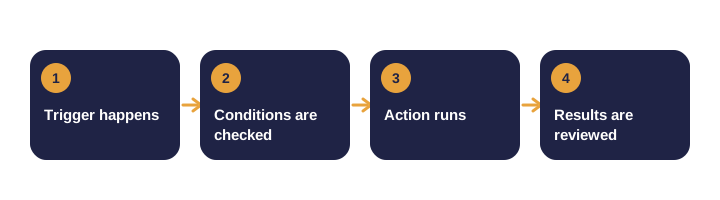
An automation is a simple rule: when something happens, do something else. Every automation has three parts:
| Part | What it does | Example |
|---|---|---|
| Trigger | Starts the automation | Someone downloads your guide |
| Condition | Decides what happens next | They have not booked a call yet |
| Action | Does the work | Send a short follow-up email |
Modern tools add AI to draft messages, sort leads and summarize feedback. The underlying logic is still trigger, condition and action.
Which tasks should you automate first?
Good candidates happen often, follow the same steps and lose value when delayed.
| Task | Why it is a good candidate |
|---|---|
| Welcome emails | Same sequence for every new subscriber |
| Lead follow-up | Most leads wait too long for a reply |
| Weekly reporting | Repetitive data pulls that are easy to schedule |
| Review requests | Triggered by a completed sale or project |
| Re-engaging inactive contacts | Rules based on time since last activity |
| Appointment reminders | A timed sequence reduces no-shows |
What should stay human?
- Positioning and pricing decisions.
- Sensitive customer conversations.
- Final approval of new campaigns.
- Regular review of automated messages, which can go out of date.
How do you set up your first workflow?
- Pick one measurable goal. For example, "respond to every new lead within five minutes."
- Map what happens today. Write the steps from trigger to outcome, and note where leads are lost.
- Simplify before automating. Remove unnecessary steps first.
- Choose a tool you already use. Check that it connects to your forms, email and CRM.
- Write short, honest messages. Each one needs a single clear next step.
- Test every branch. Check timing, personal fields, links and the no-reply path.
- Launch and measure weekly. Change one thing at a time so you know what caused a result.
How do you choose between tools?
Ask five questions before you buy:
- Does it do the specific job you need, reliably?
- Does it connect to your current systems without a developer?
- Can someone on your team maintain it?
- What does it cost as your contact list grows?
- How does it store and protect customer data?
What are the common mistakes?
- Automating an unclear process. Inconsistency just happens faster.
- No exit conditions. A buyer should leave the nurture sequence automatically.
- No review schedule. Offers and prices change, and automations need updating.
What results can you realistically expect?
Well-chosen first workflows usually bring three kinds of benefit:
- Faster responses to inquiries.
- More consistent follow-up.
- Time saved on reporting and admin.
Many owners find the biggest gain is the removal of tasks they used to do late at night. Set a baseline before you launch so you can compare.
Example: a lead follow-up workflow, step by step
- Trigger: a contact form is submitted on your website.
- Immediate action: send an acknowledgment email with the next step and expected reply time.
- Notify: alert the owner or the sales person by email or message.
- Condition: if no reply after one business day, send a helpful answer to the most likely question.
- Condition: if still no reply after four days, send a short check-in with an easy yes or no.
- Exit: stop the sequence as soon as someone books a call or replies.
Metrics that tell you if it works
| Metric | What it tells you |
|---|---|
| Response time | How fast leads hear back |
| Reply rate | Whether the messages start conversations |
| Booked calls | Whether the follow-up moves people forward |
| Staff hours saved | Whether the automation frees time |
Automation checklist before you launch
- The goal is written down and measurable.
- Every branch has been tested with a real inbox.
- Contacts who already converted are excluded.
- Someone owns the workflow and reviews it monthly.
- Customer data is handled under your privacy policy.
Scenario: a home renovation company
- Quote requests came in overnight, and the owner replied each morning, often a day late.
- A workflow now sends an instant confirmation, a photo gallery and a booking link.
- The team gets an alert when a request arrives, and the first call is booked within the hour.
- Reviews are requested automatically after each finished job.
Your action list for this week
- Choose one lead or customer task that you repeat every week.
- Write down its current steps, owner and time spent.
- Pick a tool you already have and build the simplest version.
- Test it with your own contact details before anyone else sees it.
Myths and facts
| Myth | Fact |
|---|---|
| Automation replaces the marketing team | It handles repetitive steps so people can focus on strategy |
| More emails means more sales | Relevant timing and a single clear next step work better |
| Set it and forget it | Automations need regular review as offers and prices change |
| You need an enterprise platform | Many small businesses start with tools they already own |
| Automated messages sound robotic | Good writing and personalization keep them human |
Summary checklist
- Answer the main question early and clearly.
- Back up every claim with evidence or a named source.
- Measure progress against your own baseline.
- Review and update the work on a regular schedule.
Where to go from here
Choose the workflow that loses the most leads or staff time, and build it this month. Our marketing automation service designs and tunes these workflows, starting with the processes that save the most time.
Book a call to find out which of your tasks are worth automating first. For email sequences, read our post on email automation workflows.
Frequently asked questions
Is marketing automation only for large companies?
No. Small businesses often gain the most from automating a few repetitive tasks such as follow-up and reporting.
Do I need an expensive platform?
Not necessarily. Many automations can be built with the email, form and CRM tools you already use. Expensive platforms make sense when volume and complexity grow.
Will automation make my marketing feel robotic?
It can if messages are generic. Write in your own voice, personalize where you can, and review the sequences regularly.